Building a Zero-Code Photography Portfolio
Google Drive as a CMS, Hugo for the site, GitHub Actions for the rest

Someone close to me is a photographer who needed a portfolio site but doesn’t want to touch a terminal, a code editor, or a “deploy” button.
Bottom Line
 Google Drive — a tool she already uses daily — can be the entire CMS. A scheduled pipeline watches her Drive folders, and when something changes it downloads the photos, rebuilds the site, and publishes it. She drags photos into a folder; that’s the whole workflow. The site costs nothing to run and needs no ongoing maintenance from either of us.
Why It Matters
The usual choices here are both bad for a non-technical user: paid platforms like  Squarespace or
  SmugMug charge monthly fees and lock you into their editor, while free static site generators assume you’re comfortable with git and a command line to publish anything. Neither fits someone whose actual requirement is “put files in a folder I already understand.” Building a small sync pipeline instead of picking one of those defaults is the difference between a site she can maintain herself for years and one that quietly breaks the moment she needs to add a photo and I’m not available.
Evidence & Explanation
The Problem
A photographer needs an online portfolio. The requirements sound simple:
- Upload photos from a phone or laptop
- Organise them into galleries
- Have them appear on a website
- No terminal. No code editors. No deployment commands.
Most solutions fail on at least one count. Managed platforms (Squarespace, SmugMug) cost money and lock you in. Self-hosted galleries need a server. Static site generators need technical knowledge to publish. The gap is between “I just want to drag photos into a folder” and “here’s your website”.
The Solution
Google Drive becomes the CMS. The photographer manages folders and photos in Drive — a tool she already uses daily. A scheduled pipeline detects changes, downloads the images, generates the site, and deploys it. Zero interaction with code, git, or the command line.
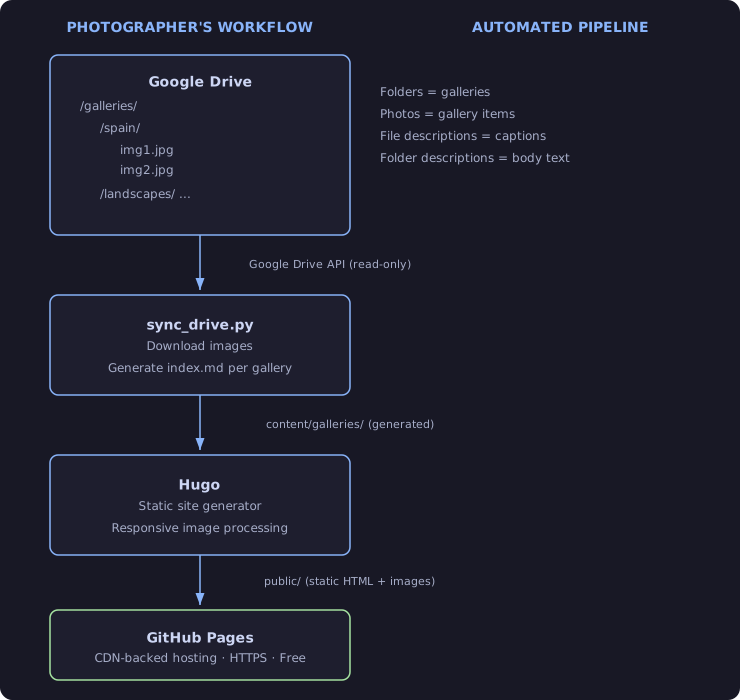
System Architecture
Component Overview
The pipeline itself is a  GitHub Actions workflow with three jobs:
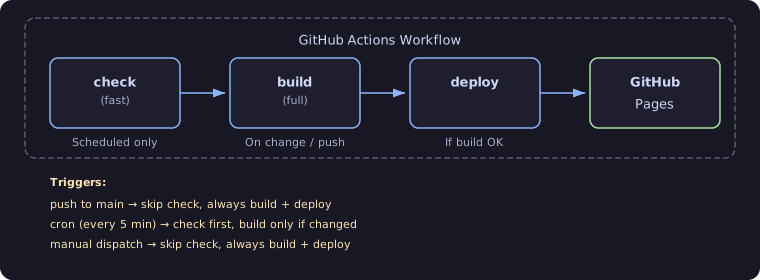
Trigger Schedule
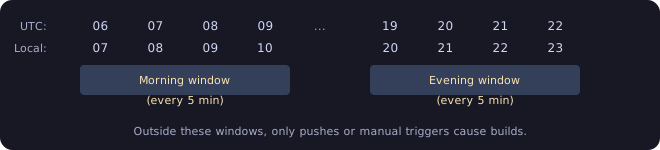
The cron schedule targets the hours the photographer is most likely editing:
The Check Job (Lightweight)
Runs on schedule only. Purpose: avoid full builds when nothing changed.
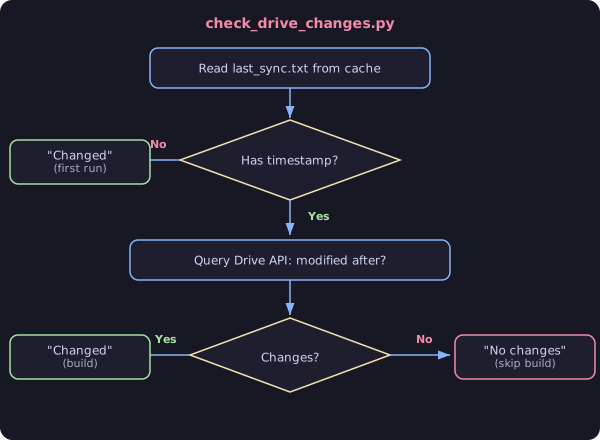
The timestamp is persisted between runs via GitHub Actions cache.
The Build Job (Full)
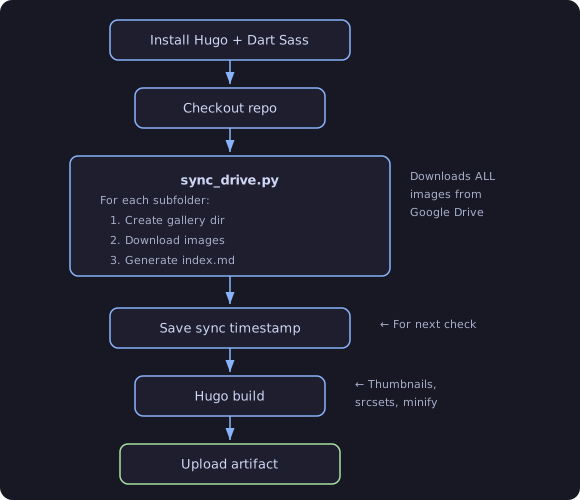
The Deploy Job
Deploys the artifact to GitHub Pages. Runs if and only if the build
job succeeded. Uses always() condition to handle the case where the
check job was skipped (push/manual triggers).
Data Flow: Drive Folder to Web Page
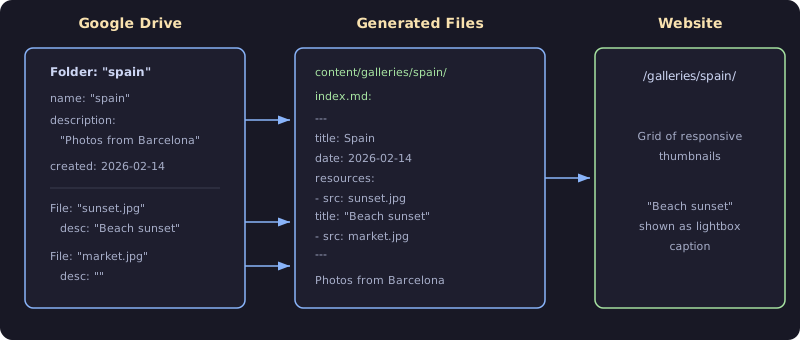
Filename Sanitisation
Drive filenames can contain spaces, uppercase, and special characters
(Copy of Copy of IMG-20241116-WA0011.jpg). The sync script normalises them:
| Original (Drive) | Saved as |
|---|---|
Copy of Copy of IMG-20241116.jpg | copy-of-copy-of-img-20241116.jpg |
My Photo (2).JPG | my-photo-(2).jpg |
sunset.jpg | sunset.jpg |
Rule: lowercase, spaces to hyphens. This prevents URL encoding issues and keeps Hugo’s image processing happy.
Repository Structure
eyes-of-wadzi/
|
+-- .github/workflows/
|     hugo.yml                 CI/CD pipeline (check -> build -> deploy)
|
+-- assets/
|     js/gallerydeluxe/src/
|       index.js               Lightbox caption logic (theme override)
|       helpers.js             Gallery helpers (copied from theme)
|       pig.js                 Justified image grid (copied from theme)
|     scss/galleriesdeluxe/
|       vars-custom.scss       Caption styling
|
+-- content/galleries/         GENERATED AT BUILD TIME (gitignored)
|     _index.md                Gallery listing page
|     spain/
|       index.md               Gallery front matter + body
|       sunset.jpg             Downloaded from Drive
|       market.jpg
|
+-- layouts/partials/
|     gallerydeluxe/
|       init.html              Adds "title" to image JSON (captions)
|     galleriesdeluxe/
|       header.html            Simplified nav (gallery list only)
|
+-- scripts/
|     sync_drive.py            Drive -> content/galleries/ generator
|     check_drive_changes.py   Lightweight change detection
|
+-- hugo.toml                  Site config (theme, image processing)
+-- requirements.txt           Python deps (google-api-python-client, google-auth)
+-- .gitignore                 Excludes content/galleries/
Key point: content/galleries/ does not exist in git. It is entirely
generated at build time from Google Drive. The .gitignore ensures it is
never accidentally committed.
Theme Architecture
The site uses the Galleries Deluxe
 Hugo theme, imported as a Hugo Module (not a git submodule).
| Module | Role |
|---|---|
| galleriesdeluxe | Multi-gallery wrapper |
| gallerydeluxe | Single gallery renderer, Pig.js grid |
| hugo-mod-misc/common-partials | SEO, Open Graph |
Theme Overrides
The project overrides specific theme files to add caption support:
| Theme File | Override Purpose |
|---|---|
partials/gallerydeluxe/init.html | Add “title” field to image JSON so captions are available in JS |
partials/galleriesdeluxe/header.html | Show flat gallery list in nav instead of category hierarchy |
js/gallerydeluxe/src/index.js | Display caption in lightbox when image title differs from filename |
scss/galleriesdeluxe/vars-custom.scss | Style the caption overlay |
Image Processing Pipeline
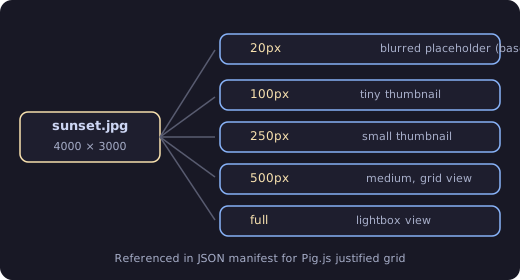
Hugo processes each source image into multiple sizes for responsive loading:
Security Model
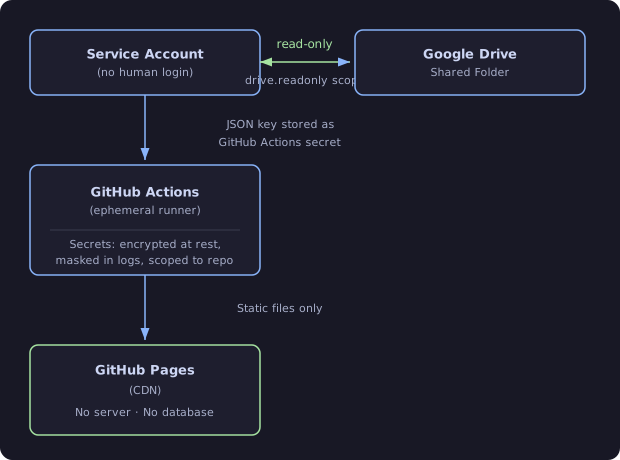
Key security properties:
- Service account has read-only access to one shared folder
- No human credentials in the pipeline
- Credentials passed via environment variable, never written to disk in CI
- The deployed site is fully static – no server, no API, no attack surface
- GitHub Pages provides HTTPS by default
Caching Strategy
Four caches reduce build time and API usage:
| Cache | Key | Purpose |
|---|---|---|
| pip packages | requirements.txt hash | Skip pip install (~5s saved) |
| Hugo modules | go.sum hash | Skip module download (~6s saved) |
| Hugo image cache | Built-in (4320h TTL) | Skip image reprocessing |
| Sync timestamp | drive-sync-timestamp | Skip builds when Drive unchanged |
The sync timestamp cache is the most impactful: it turns a ~40s build into a ~10s no-op check on every 5-minute cron run when nothing has changed.
Secrets & Configuration
Two GitHub Actions secrets are required:
| Secret | Content |
|---|---|
GOOGLE_CREDENTIALS_FILE | Full JSON of service account key |
GOOGLE_DRIVE_FOLDER_ID | ID of the shared Drive folder |
The folder ID comes from the Drive URL:
https://drive.google.com/drive/folders/<THIS_PART>
Cost
Everything in this stack is free:
| Component | Cost | Limits |
|---|---|---|
| Google Drive | Free | 15 GB storage |
| Google Drive API | Free | 20,000 queries/day |
| GitHub Actions | Free | 2,000 min/month (public repos) |
| GitHub Pages | Free | 1 GB site size, 100 GB bandwidth/mo |
| Hugo | Free | Open source |
At ~10s per check and 5-minute intervals over 7 hours/day, scheduled runs consume roughly 7 x 12 x 10s / 60 = ~14 minutes/day of Actions time.
Practical Application
If you’re building something similar for a non-technical stakeholder, the pattern generalises:
- Find the storage they already trust. Drive, Dropbox, a shared folder — whatever they already use daily is a better CMS for them than any admin panel you could build.
- Make change detection cheap and separate from the build. A ~10-second check job that skips 95% of scheduled runs is what makes polling every few minutes affordable instead of wasteful.
- Scope credentials to exactly what the pipeline needs. A read-only service account on one shared folder, injected as an environment variable and never written to disk, means a leaked CI log can’t expose anything beyond that one folder.
- Keep generated content out of version control. Anything the pipeline can regenerate from the source of truth (Drive, in this case) doesn’t belong in git —
.gitignoreit and rebuild it every run.
Final Takeaway
The real engineering decision here wasn’t which static site generator or theme to use — it was recognising that the actual problem was “avoid needing a CMS at all,” not “build a good one.” Once that reframing happened, the rest — Drive as storage, a cheap change-detection step, a fully static and free hosting target — followed naturally, and the result needs zero maintenance from either of us going forward.
If you want to see it:  Eyes of Wadzi.