One Droplet, One YAML File, Two Production Apps
How Handovha and Mail Koenig are hosted — no Kubernetes, no Terraform, no PaaS

Two production Node apps —  Handovha and Mail Koenig — run on one
  DigitalOcean droplet at the smallest tier DigitalOcean sells. No
  Kubernetes, no
  Terraform, no PaaS.
Bottom Line
The whole setup is one YAML file (infra/apps.yaml) describing the droplet and every app on it, read by three idempotent bash scripts (setup.sh, deploy.sh, db.sh). Adding an app means adding a YAML entry and running two commands. Every provisioning step checks its own state before acting, so re-running the same script against a live box is always safe — there’s no separate “first run” versus “update” path to keep in sync.
Why It Matters
Small production systems tend toward one of two failure modes: zero infrastructure discipline (a box someone SSH’d into once and git pulls on, that nobody could rebuild from scratch), or infrastructure built for a scale that doesn’t exist yet (a Kubernetes cluster for two apps doing a few requests a minute). Neither is right for a couple of side projects that need to actually stay up. The useful middle ground — infrastructure described in a file your scripts can read, applied idempotently — gets you the actual benefits people reach for orchestration platforms for (reproducibility, “what’s actually running,” safe re-application) without paying the operational tax of running something built for a fleet of machines.
Evidence & Explanation
The manifest
Everything starts from one file:
droplet:
  name: handover-prod-lon1
  region: lon1
  size: s-1vcpu-1gb
  image: ubuntu-24-04-x64
  volume_name: handover-data
  volume_size_gib: 5

apps:
  - name: handover
    path: apps/handover
    port: 3000
    domains: [handovha.com, www.handovha.com, app.handovha.com]
    uploads: true
    rate_limited_paths: ["/login"]
    pre_deploy_hook: infra/deploy-hooks/handover.sh

  - name: mail_king
    path: apps/mail_king
    port: 3001
    domains: []
    worker_entry: dist/worker.js
    rate_limited_paths: ["/login", "/domains"]
Nothing about  nginx,
  systemd,
  Postgres, or DNS lives anywhere else.
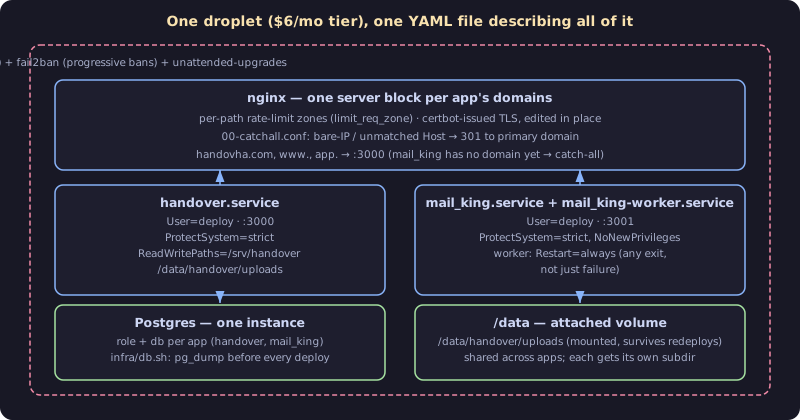
 mail_king has no domain yet — it’s still routed through a fallback rather than sitting unreachable, which the setup script handles explicitly rather than as an edge case someone has to remember.
Provisioning is idempotent, not a one-shot script
setup.sh replaced six separate one-off scripts (bootstrap.sh, droplet/create.sh, droplet/harden.sh, droplet/check.sh, droplet/enable-http2.sh, dns/set-droplet-ip.sh) with one that’s safe to run again at any time, against a droplet that already exists, to bring it to the state the manifest describes. Every step is a check-then-act:
remote "sudo -u postgres psql -tc \"SELECT 1 FROM pg_roles WHERE rolname='$NAME'\" | grep -q 1 || \
  sudo -u postgres psql -c \"CREATE ROLE $NAME LOGIN PASSWORD '$PG_PASSWORD';\""
Create the role only if it doesn’t exist; same pattern for the database, the SSH key, the DNS record, the systemd unit. The alternative — a script that only works once, followed by manual patches for every subsequent change — is how infrastructure drifts from what’s actually documented. An idempotent script is the documentation, because it’s also the only thing anyone runs.
The security hardening isn’t bolted on afterward either — it’s the second thing setup.sh does, before any app-specific work:
sudo tee /etc/ssh/sshd_config.d/99-hardening.conf >/dev/null <<'SSHEOF'
PermitRootLogin no
PasswordAuthentication no
SSHEOF
...
sudo ufw limit OpenSSH
sudo ufw allow 'Nginx Full'
sudo ufw --force enable
...
sudo tee /etc/fail2ban/jail.local >/dev/null <<'F2BEOF'
[DEFAULT]
bantime = 1h
bantime.increment = true
bantime.factor = 2
bantime.maxtime = 1w
findtime = 10m
maxretry = 5
F2BEOF
 ufw locks the firewall down to just SSH and nginx’s ports first;
  fail2ban’s ban time doubles on repeat offenders up to a week — a single blocked attempt costs an attacker an hour, but a scripted, repeated one gets progressively more expensive to keep retrying.
Nginx config is generated, not hand-edited
Each app’s nginx site is rendered from one template with its domains, port, and rate-limited paths substituted in:
server {
    listen 80;
    listen [::]:80;
    server_name {{DOMAINS}};

    server_tokens off;
    client_max_body_size 130m;

{{RATE_LIMIT_LOCATIONS}}
    location / {
        proxy_pass http://127.0.0.1:{{PORT}};
        proxy_http_version 1.1;
        proxy_set_header Host $host;
        ...
    }
}
It’s deliberately HTTP-only.  Certbot edits the live file on the droplet in place to add the HTTPS block once DNS resolves — re-rendering this template later never wipes out certbot’s work, because the template only ever describes the pre-TLS state and is never reapplied wholesale after TLS exists.
A request to the droplet’s bare IP, or any Host header that doesn’t match a configured domain — bots and scanners routinely skip DNS and hit IPs directly — gets a dedicated catch-all instead of silently falling through to whichever server block nginx happens to pick first:
server {
    listen 80 default_server;
    listen [::]:80 default_server;
    server_name _;
    server_tokens off;
    return 301 https://{{PRIMARY_DOMAIN}}$request_uri;
}
Rate limiting is per-path, generated once per app into a shared zones file regardless of which single app setup.sh was asked to provision — running it for just mail_king still regenerates handover’s zones too, deliberately, so a targeted run can’t silently erase another app’s protection.
Systemd units are hardened, not just “run the process”
[Service]
Type=simple
User=deploy
WorkingDirectory=/srv/{{NAME}}
EnvironmentFile=/etc/{{NAME}}/env
ExecStart=/usr/bin/node dist/index.js
Restart=on-failure
RestartSec=5
NoNewPrivileges=true
ProtectSystem=strict
ReadWritePaths=/srv/{{NAME}}{{UPLOADS_LINE}}
ProtectHome=true
ProtectSystem=strict makes the entire filesystem read-only to the process except the paths explicitly listed in ReadWritePaths — its own deploy directory, and its uploads directory if it has one. A compromised or buggy app process can’t write outside those two places even if it tries; the blast radius of “this one Node process does something it shouldn’t” is capped at the OS level, not just by application code being careful.
The deploy itself has no room to get creative
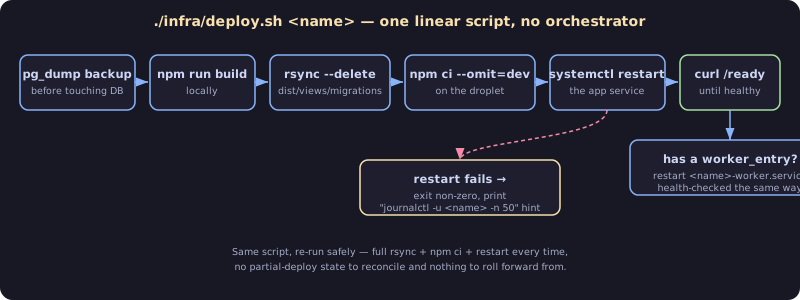
echo "== backing up $NAME's database =="
"$REPO_ROOT/infra/db.sh" "$NAME" backup || echo "(backup skipped/failed — continuing)"

echo "== building $NAME =="
(cd "$APP_DIR" && npm run build)

rsync -az --delete -e "ssh ${SSH_OPTS[*]}" --exclude 'dist/test' "${RSYNC_SOURCES[@]}" "deploy@$DROPLET_IP:/srv/$NAME/"

echo "== installing production dependencies =="
remote "cd /srv/$NAME && npm ci --omit=dev"

echo "== restarting $NAME.service =="
remote "sudo systemctl restart $NAME"
remote "systemctl is-active --quiet $NAME" || {
  echo "$NAME.service failed to start — check: ssh -i $SSH_KEY deploy@$DROPLET_IP journalctl -u $NAME -n 50" >&2
  exit 1
}

echo "== health check =="
remote "curl -fsS http://127.0.0.1:\$(grep '^PORT=' /etc/$NAME/env | cut -d= -f2)/ready"
A database backup runs before anything touches the app, every single time, on the assumption that “just this once, I’ll skip it” is exactly when it turns out to matter. rsync --delete only ships what the app actually needs at runtime — dist/, views/, migrations/, public/, the lockfile — not the whole repository, so a stray local file never accidentally ends up in production. And the deploy doesn’t declare success until /ready actually answers, which is the difference between “the process started” and “the process is serving traffic correctly,” including a working database connection.
Backups are a script, not a habit someone has to remember
case "$ACTION" in
  backup)
    ...
    remote "DATABASE_URL=\$(grep '^DATABASE_URL=' /etc/$NAME/env | cut -d= -f2-); pg_dump \"\$DATABASE_URL\" | gzip" > "$OUT"
    ;;
  restore)
    ...
    echo "Type RESTORE to confirm: "
    read -r -p "Type RESTORE to confirm: " CONFIRM
    [[ "$CONFIRM" != "RESTORE" ]] && { echo "Aborted — nothing changed."; exit 1; }
    gzip -dc "$FILE" | remote "..."
    ;;
esac
db.sh is the one place that ever touches a database directly, used identically by setup.sh, deploy.sh, and by hand. A restore is a genuinely destructive, hard-to-undo action, so it’s the one command in this whole system that stops and demands you type a word before it proceeds — everything else runs unattended by design, and that asymmetry is deliberate.
Practical Application
If you’re hosting more than a toy project on a budget, and you’re deciding between “wing it on a box” and “reach for an orchestration platform”:
- Write down what’s running in a file your scripts read, before you write the scripts. The manifest is what turns “SSH in and remember what you did” into “read this file and know exactly what should be running.”
- Make every provisioning step idempotent from the first version. Check before you act, on everything — a role, a file, a systemd unit, a DNS record. It’s what makes it safe to run the exact same command a year later without fear.
- Harden the systemd unit itself, not just the firewall.
ProtectSystem=strict,NoNewPrivileges, and a tightly scopedReadWritePathsare a few lines each and meaningfully shrink what a compromised process can do. - Never let a deploy skip the backup, and never let a restore skip confirmation. The two mistakes that are actually expensive — losing data on deploy, or destroying it on restore — are exactly the two places worth spending the extra line of caution.
- Health-check after every restart, and fail loudly if it doesn’t pass. “The process started” and “the process works” are different claims; only the second one should let a deploy call itself done.
Final Takeaway
Reproducible, safe infrastructure doesn’t require a platform team, a config-management framework, or an orchestrator. A single droplet, one YAML file describing what should be running on it, and a handful of scripts that check before they act is a genuinely sufficient production setup for the scale most side projects and small products actually operate at — and it’s small enough that one person can hold the entire thing in their head.